











Our UIUX design for real estate has been tailored with a strong focus on digital marketplaces. The goal is to bring more business and boost sales.
UI/UX Design and Development Services
At Digisoft Solution, we design user-centric, data-driven digital experiences powered by AI-enhanced interactions and intuitive interface patterns. Our solutions enhance engagement, reduce friction, and boost measurable growth by aligning users' needs with business goals. They improve product adoption across web, mobile, and enterprise platforms.
.webp)
Challenges
UI/UX Challenges That Limit Digital Performance & Business Outcomes
Poor interface architecture and interaction design don’t just affect products — they impact enterprise platforms, websites, portals, SaaS systems, and custom software. We identify structural UX gaps across digital ecosystems and resolve the friction that slows adoption, efficiency, and scalability.
Inefficient Task Flows Across Applications
- Issue Redundant steps, unclear state transitions, weak interaction feedback, and fragmented workflows.
- Impact Lower task completion rates, reduced productivity, higher abandonment.
- How We Fix It We restructure workflows, optimize interaction sequences, and align task flows with real user behavior patterns.
Poor Information Architecture in Complex Systems
- Issue Misaligned taxonomy, deep navigation layers, inconsistent labeling, and feature sprawl.
- Impact Users struggle to locate functions. System usability decreases.
- How We Fix It We redesign content structure, simplify navigation depth, and align architecture with functional priorities.
High Cognitive Load in Dashboards & Enterprise Tools
- Issue Overloaded interfaces, dense data presentation, weak visual hierarchy, unclear affordances.
- Impact User fatigue, slower decision-making, operational inefficiency.
- How We Fix It We apply structured hierarchy, modular layouts, and progressive disclosure to improve clarity and usability.
Cross-Platform Inconsistency
- Issue Disconnected experiences across web apps, mobile apps, internal tools, and portals.
- Impact Reduced trust, inconsistent usability, fragmented brand perception.
- How We Fix It We implement unified design systems and scalable component libraries to maintain consistency across environments.
Weak Onboarding & Adoption in Software Systems
- Issue New users lack contextual guidance, resulting in slow adoption and support dependency.
- Impact Low activation, increased training cost, higher churn.
- How We Fix It We design structured onboarding, contextual tooltips, guided flows, and milestone-based engagement systems.
Mobile & Responsive Gaps in Business Applications
- Issue Improper responsive behavior, touch interaction issues, performance bottlenecks.
- Impact Reduced usability on mobile devices and remote workflows.
- How We Fix It We optimize layout systems, interaction density, and mobile-first architecture.
Accessibility & Compliance Risks
- Issue Insufficient accessibility standards, poor contrast, missing semantic structure.
- Impact Limited usability and potential compliance exposure.
- How We Fix It We implement inclusive interaction models and accessibility-aligned interface standards.
Legacy UI & Design System Fragmentation
- Issue Inconsistent components, outdated UI patterns, lack of scalable design tokens.
- Impact Slower development cycles and UX inconsistency.
- How We Fix It We build structured design systems, reusable components, and scalable UI frameworks.
Data-Driven UX Gaps
- Issue Design decisions without analytics validation or usability testing.
- Impact Inefficient iterations and missed optimization opportunities.
- How We Fix It We integrate behavioral analytics, testing frameworks, and continuous UX performance monitoring.
Have a system or platform you want to improve?
We engineer usable, scalable, and performance-driven digital experiences across enterprise systems, applications, and platforms.
Solutions
Strategic UI/UX Solutions That Elevate Digital Experiences
At Digisoft Solution, we don't just design screens; we design scalable UX ecosystems that deliver experiences to solve complex product issues and drive measurable business growth. Our future-ready UX strategy combines behavioural technology, immersive prototyping, and rapid, iterative validation to design flexible, personalised, and intuitive user experiences that meet changing user needs.
AI-Powered Personalization
Dynamic content changes in real time using AI-powered predictive behavior modeling to deliver customized CTAs and tailor recommendations for service and layout changes to boost engagement, conversion, and satisfaction. This reduces the requirement for vast manual testing and lowers optimization costs.
Voice & Conversational Navigation
Integrate a natural voice-based UI to assist in service discovery by utilizing AI assistants that guide you through your choices, answer FAQs, and finish tasks. It enhances accessibility and reduces friction for users overwhelmed by options and menus.
Micro-Interactions Using Haptics
Smart micro-interactions with subtle animations improve clarity, guide attention, reduce cognitive load, engage users, highlight progress, and enhance engagement.
Case Study
Behind the Code: Unveiling Success Through Case Studies

A global grocery platform on Shopify serving 150+ countries with real-time stock and seamless checkout.

RISE311 is a Shopify store offering plant-based protein powders with flexible subscriptions, custom bundles, and email marketing.
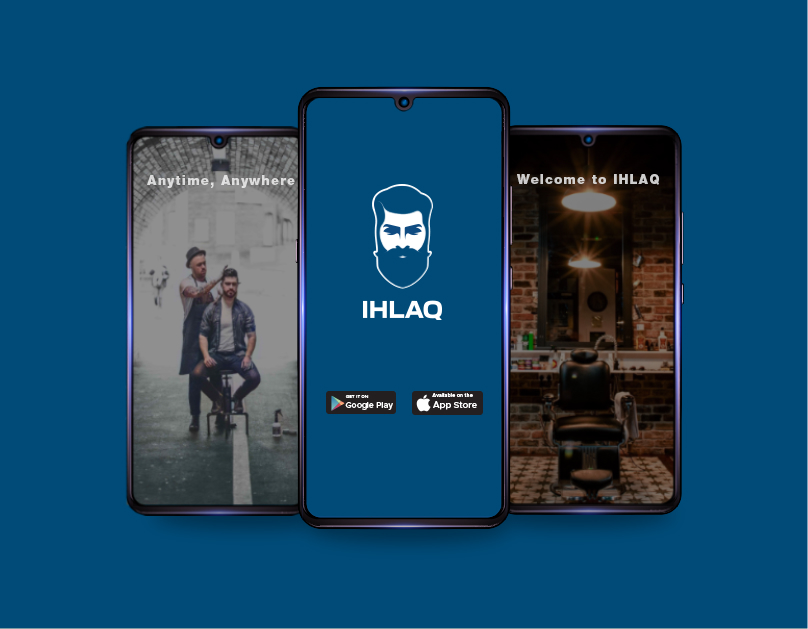
A Qatar grooming marketplace with 5,000+ peak daily bookings, conflict-free scheduling, hybrid home and salon services, and bilingual Arabic RTL support across web and mobile.

A scalable Flutter-based gardening app delivering expert access, personalized plant care, and on-demand services.

An API-driven event platform enabling real-time synchronization, high scalability, and seamless hybrid event execution across global life sciences teams.
A global grocery platform on Shopify serving 150+ countries with real-time stock and seamless checkout.
RISE311 is a Shopify store offering plant-based protein powders with flexible subscriptions, custom bundles, and email marketing.
A Qatar grooming marketplace with 5,000+ peak daily bookings, conflict-free scheduling, hybrid home and salon services, and bilingual Arabic RTL support across web and mobile.
A scalable Flutter-based gardening app delivering expert access, personalized plant care, and on-demand services.
An API-driven event platform enabling real-time synchronization, high scalability, and seamless hybrid event execution across global life sciences teams.
UI/UX Design
Strategic UI/UX Design Services Built for Growth and Innovation
Our experts provide a comprehensive suite of UI/UX design services tailored to your brand identity and vision. We craft every design to deliver intuitive, memorable experiences.
User Interface (UI) Design
Our UI/UX design process, as a trusted UI UX design agency, creates functional digital interfaces that attract & retain a wide user base with seamless and engaging experiences.
User Experience (UX) Design
Hire our expert team for innovative UI UX design service, delivering user-centric designs focused on your target audience and ensuring seamless navigation for an exceptional user experience.
UI/UX Consulting & Experience Audits
Our UI/UX consulting services aim to enhance the design and utilization of your digital products and services, improving functionality, user experience, and engagement through seamless and efficient design solutions.
Web Experience Design
Our best UI UX design and development services focus on visual appeal while ensuring the technical aspects deliver a fully functional site, providing an engaging and seamless experience for users.
UI/UX Design & Development for Mobile Apps
Our mobile app design specialists are known for their responsive designs to provide a uniform customer experience. We ensure that functionality and aesthetics align to deliver exceptional user satisfaction.
Interaction & Motion Design
Our user experience interaction designers create interactive products, environments, systems, and services tailored to user behavior, ensuring seamless engagement and intuitive experiences for users across various platforms.
UX Research & Usability Testing
Our experts use advanced research methods, along with AI-driven behavioural insights, to identify friction points, validate decisions, and design data-backed experiences that facilitate retention and business performance.
Design Systems & Component Libraries
Create strong design systems with reusable components, tokenized styling, accessibility standards, and AI-assisted documentation to ensure brand consistency, accelerate development, and enable seamless scalability across teams and products.
Wireframing and Interactive Prototyping
Convert concepts into structured, interactive wireframes and high-fidelity prototypes that mimic real-world user flows. Verify concepts before development, reduce development risk, and accelerate stakeholder alignment with a realistic, interactive, and testable digital experience.
UI/UX Design
Why Choose Us as UI/UX Design Company
At Digisoft Solution, we take our work beyond visual design. We design user-centric digital experiences that increase engagement, usability, and conversion rates. Our UI/UX experts collaborate with stakeholders and product owners to turn ideas into user-friendly, scalable interfaces.
We work with clients across many industries and regions, providing UI/UX solutions that align with international usability standards and current design standards.
Starting with UX studies and wireframing, through prototyping and interface design, and handoff to developers, we manage the entire design process under one roof.
Designers and UX strategists with hands-on experience on mobile apps, web applications, software, SaaS platforms, and enterprise software products.
Our expert UI/UX designers create designs that adhere to established accessibility principles and usability guidelines (such as WCAG), ensuring your product is user-friendly and accessible to all users.
You receive regular reviews of your design, prototype walkthroughs, and feedback loops to ensure you are aligned at every phase of the UI/UX journey.
Our UI/UX team works closely with developers to ensure a smooth handoff, consistent design systems, and precise implementation.
Let’s Discover How Our Groundbreaking UI/UX Solutions Elevate Your Business Game!
Empower your business with Digisoft Solution, the leading UI UX design company in the USA
Our UI/UX Design & Development Approach
At Digisoft Solution, we adhere to a structured, research-driven UI/UX design methodology focused on clarity, usability, and measurable results. Our approach ensures that each design choice aligns with user behavior and business goals.
01
Discovery & Product Understanding
We start by analyzing your product's business model, goals, the target audience, and success metrics. This is the phase where we align design direction with the business outcomes.
02
User & Market Research
Our UI/UX experts conduct research on users, competitors, and user behaviour through interviews, surveys, and product audits to identify real users' needs and friction points.
03
Information Architecture & User Journey Mapping
We define the content structure, navigation logic, and user flows to help users accomplish their objectives quickly and efficiently.
04
Wireframing & Interactive Prototyping
Low-fidelity wireframes are designed to establish the layout, content hierarchy, and functionality before styling is applied.
05
Usability Testing and Validation
Our experts test prototypes with users to identify usability issues and friction areas and then refine our designs based on the results.
06
Visual UI Design
We employ typography, brand colours, and interface elements to create visually appealing, consistent designs.
07
Design System & Developer Handoff
We create comprehensive design systems, component libraries, and detailed specifications to ensure smooth, precise implementation by development teams.
08
Continuous UX Optimization
After launch, we review user behavior and feedback to continually enhance the user experience and engagement.
Engagement Model
Flexible UX Engagement Models Designed Around Your Product Goals
Clear Deliverables & Accountability
Defined scope, quantifiable timelines, transparent milestones, and clear ownership guarantee the most predictable results and complete delivery accountability.
Aligned with your Workflow
Seamless integration into your process via plug-in collaboration or fully managed execution models.
Flexible Contracting
Choose a fixed-cost retainer or an hourly model tailored to the project's scope, budget, and changing priorities.
Scalable with Your Growth
Rapidly scale teams either up or down to meet demands, ensuring agility without disrupting operations.
Let’s Create a Future Filled with Positive Experiences
The future is here, and we are committed to building it. Let us join hands with the best UI UX design company in India to create a world that is sustainable, inclusive, and equitable for all.
 Talk to Our Experts!
Our technologies
Web Development Technologies We Use
Industries we cater to
Industries we cater to
We have worked with diverse industries, catering to their requirements effectively and providing viable solutions.
Witness our logistics UI/UX design competencies, including technology integration for optimal supply chain management, automated deliveries, and enhanced tracking capabilities.
Corporate
Our corporate UI/UX design expertise emphasises crafting a secure, scalable platform that is supported by internal operations to deliver greater efficiency at lower cost.
We provide top-notch UI/UX design services for manufacturing services crafted with a vision to improve business transactions, enhance experiences, and ensure seamless ERP integration.
IT
IT UI/UX design boosts your software and hardware sales and delivers an outstanding user experience. The solution is completely fabricated to your goals and mission.
Our UI/UX design services for healthcare support the creation of an ultra-secure platform. The objective is to diversify the product offering to support holistic patient care and improve accessibility.
Our UI/UX design for web food applications has been curated to ease the online ordering, delivery, and subscription services while emphasizing convenience and unforgettable experiences.
Our automotive UI/UX design services aim to boost sales, enable effortless ordering of parts, and facilitate booking maintenance schedules.
Entertainment
UIUX design services for entertainment involve designing platforms for ticket sales, streaming services, and personalized content recommendations to enhance user engagement and revenue.
Discover our cutting-edge retail UI/UX design potential, featuring intuitive platform designs to drive better sales and provide a seamless checkout process.
Beauty
Leave a memorable impression through an attractive website design. The platform helps you to deliver personalized recommendations and subscription services to hook the audience’s attention.
Travel & Tourism
Our travel and tourism websites have been created to render personalized experiences, provide virtual tours and ensure a swift booking process. This attracts the customers and amplifies your conversions.

Our experts help businesses build scalable, secure, and high-performance software solutions tailored to their industry. Book a free consultation with our senior consultants today.
Book Your Free ConsultationFAQ's
Frequently Asked Questions
Here are some of the most common questions we get from the amazing folks we partner with.
Look for agencies that treat UI/UX as a full discipline, not an add-on to development, meaning dedicated designers, not developers designing on the side. Digisoft Solution offers UI/UX design and development as a standalone service, covering wireframing, prototyping, and full design systems built in Figma. If a provider can't show you a UX process beyond "we'll make it look nice," that's usually a sign to keep looking.
A solid UI/UX strategy rests on four things: user research, information architecture, interaction design, and accessibility. Skipping user research is the most common mistake, since it leads to interfaces that look polished but confuse the actual people using them. We build design systems around WCAG 2.2 accessibility standards and real user flows, not just visual trends, so the product holds up once it's in front of real users.
Look for firms with a documented design process, real case studies, and experience across multiple industries, not just a nice portfolio site. Digisoft Solution has delivered UI/UX work for clients across healthcare, retail, and e-commerce, backed by 13+ years of combined design and development experience. Ask any provider to walk you through a past project's design decisions, not just show you the final screens, that's usually where the real difference shows up.
Good UX directly affects conversion rates, user retention, and support costs, since a confusing interface drives people away before they ever reach a sale or signup. Poor UX is often an invisible cost, showing up as high bounce rates or abandoned carts rather than an obvious complaint. Investing in UX upfront tends to cost less than fixing a broken user journey after launch, when changes are harder and more expensive to make.
Ask to see their design process end to end, from research to wireframes to final handoff, not just finished mockups. Check whether they design with development in mind, since a beautiful design that's hard to build in code causes delays and rework later. Digisoft Solution pairs UI/UX designers directly with our development team, so designs are built to be implemented, not just admired.
It generally moves through five stages: user research, wireframing, prototyping, visual design, and usability testing before handoff to development. Usability testing is the step most often skipped, and it's usually where real problems get caught before they become expensive to fix. We follow this process on every project, adjusting depth based on project size and timeline.
Yes, and startups don't need a full enterprise design system on day one, a focused MVP-level design process is usually enough to validate the product first. Digisoft Solution offers UI/UX design as part of flexible engagement models, including hourly and project-based pricing, so early-stage teams aren't paying for scope they don't need yet. The priority for startups should be usability and clarity over polish, since that can be refined once the product finds traction.
Cost depends on project scope, number of screens or flows, and whether you need a full design system versus a single product's interface. A simple MVP design costs significantly less than an enterprise platform requiring accessibility compliance, multiple user roles, and complex dashboards. Getting an accurate number means scoping the project first, since UI/UX pricing varies more by complexity than by hours alone.
Quality UI/UX work includes user research, accessibility compliance, a documented design system, and close collaboration with development, not just attractive visuals. Look for providers who test designs with real users before final handoff, since that's often where usability issues surface. Digisoft Solution builds Figma-based design systems with accessibility annotations and design tokens, so designs stay consistent as the product scales.
Yes, though enterprise UI/UX work requires more than good visual design, it needs to handle multiple user roles, dense data, and accessibility standards without becoming overwhelming. Digisoft Solution designs for enterprise systems using human-centered design principles alongside WCAG 2.2 accessibility standards, built to work across large user bases and complex permission structures. Ask any provider specifically about enterprise dashboard or multi-role design experience, since that's a different skill set than consumer-facing design.
We offer end-to-end UI/UX design services, including UX analysis, wireframing, prototyping, UI design, usability testing, accessibility audits, design systems, and conversion-focused optimization for mobile and web-based applications.
We employ data-driven UX research, journey mapping, user personas, usability testing, and behavioural analytics to create experiences that meet user needs and align with business objectives.
We regularly integrate AI-assisted design workflows, accessibility-first guidelines, microinteractions, personalization, motion UI, and responsive design. We also offer flexible design systems aligned with current product development standards.
Our methodology involves discovery, user research, wireframing, prototyping, UI design, validation testing, system design, and handoff to developers to ensure a seamless implementation.
A typical UI/UX project takes between 4 and 12 weeks, depending on the extent of research, complexity, number of screens, and overall scope.
Yes. Our team conducts UX audits, identifies usability gaps, improves accessibility and navigation, and modifies interfaces to increase engagement, retention, and conversions.
We monitor KPIs such as user engagement, task completion rate, bounce rate, customer satisfaction (CSAT), and post-implementation conversion rate improvements.
Yes. We create scalable design systems that can be reused alongside style guides and documentation to ensure brand consistency and speed up product development.
Absolutely. We design adaptive, responsive interfaces optimized for a mobile-first experience across the web, iOS, Android, and SaaS platforms.
Digisoft Solution combines research-driven design, trend-aligned innovations, accessibility standards, and conversion-focused strategies to create a scalable digital experience that drives measurable business growth.